Building Cloud-to-Ground: A Hybrid Azure Honeypot & SOAR Integration

How I built a hybrid cloud honeypot that captures real-world attacks in Azure, automates threat intelligence workflows with n8n, and publishes a public blocklist feed - including the challenges I faced and lessons learned.
Published on January 09, 2026 by Kyle S
azure sentinel honeypot soar automation threat-intelligence n8n kql
11 min READ
Building Cloud-to-Ground: A Hybrid Azure Honeypot & SOAR Integration
What happens when you deliberately expose an RDP port to the internet? Within minutes, attackers from around the world start knocking. Within hours, you have a goldmine of threat data. The challenge isn’t collecting the attacks - it’s building the automation to turn raw security events into something useful.
This project bridges cloud security monitoring with local SOC operations. It’s not just another “deploy a honeypot and watch logs” tutorial. This is about creating a complete automation pipeline that:
- Deploys infrastructure in minutes using Infrastructure as Code
- Captures real-world brute-force attempts in Azure Sentinel
- Automatically enriches attack data with geolocation intelligence
- Orchestrates multi-platform workflows with n8n SOAR
- Publishes a public threat feed that anyone can consume
Live Threat Feed: https://gist.github.com/kyhomelab/eb6f58df93df4ea994b1a2a66d8610e6
GitHub Repository: https://github.com/kyhomelab/azure-sentinel-honeypot
Why I Built This
Most honeypot tutorials stop at the “interesting” part - watching attacks happen on a dashboard. But that’s where the real work should begin. I wanted to answer these questions:
Can I automate the entire pipeline? From cloud detection to local response to public sharing - no manual log reviews, no copy-pasting IPs into spreadsheets.
Can I create something genuinely useful? The public blocklist isn’t just for show. It’s a real threat feed that security teams can consume, whether they’re blocking IPs at the firewall or enriching their own SIEM alerts.
How do cloud and local security tools actually integrate? Azure Sentinel is powerful, but most SOC teams have local infrastructure too. How do you bridge that gap?
This project became my answer to all three questions.
The Architecture: Cloud Meets Homelab
The system connects three distinct environments: Azure cloud infrastructure, my local homelab SOC, and a public GitHub Gist for threat sharing.
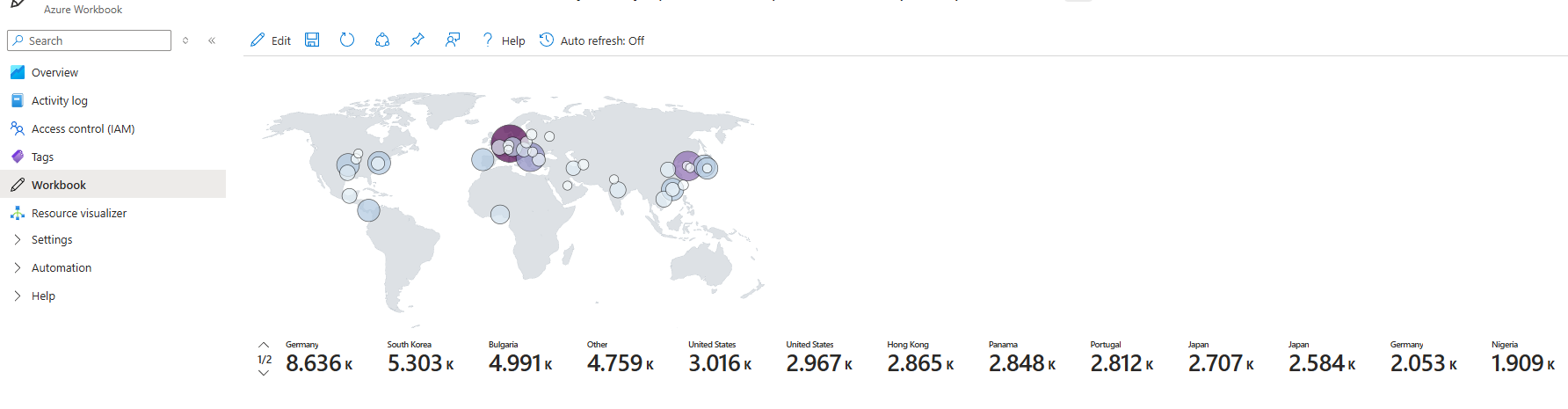 Real-time attack map showing brute-force attempts from around the world
Here’s how the components work together:
Azure Cloud Layer:
- Windows Honeypot VM - Deliberately misconfigured (RDP exposed, Windows Firewall disabled, NLA off) to attract attackers
- Log Analytics Workspace - Centralized log collection for all security events
- Azure Sentinel - Cloud SIEM running KQL detection queries every 10 minutes
Local Homelab Layer:
- n8n Automation Platform - SOAR workflows orchestrating the entire pipeline
- TheHive Case Management - (Future integration) Automated case creation for high-severity attacks
- MISP Threat Intelligence - (Future integration) IOC correlation with known threat actors
Public Internet Layer:
- GitHub Gist - Public threat feed automatically updated with attacker IPs
The data flow is simple but powerful: Sentinel detects failed login attempts, n8n pulls that data via Azure API, formats it into a readable blocklist, and pushes it to GitHub. All automatic. All running 24/7.
The Tech Stack
| Component | Technology | Purpose |
|---|---|---|
| Infrastructure | Azure Bicep | Reproducible IaC deployment |
| SIEM | Azure Sentinel | Cloud-native security monitoring |
| Detection | KQL Queries | Failed RDP attempts, geo-enrichment |
| Automation | n8n | SOAR workflows and API orchestration |
| Authentication | Azure AD App Registration | API access to Sentinel |
| Threat Sharing | GitHub API | Public IOC feed distribution |
What I Learned: The Real Education
This project taught me more than any certification course because everything was hands-on, real-world, and didn’t always go according to plan.
Infrastructure as Code is Non-Negotiable
Before this project, I’d spin up Azure resources manually through the portal. Click, click, wait, hope you didn’t miss a setting. Bicep changed everything. The entire environment - VM, network, NSG rules, monitoring agents - deploys with a single command:
az deployment group create \
  --resource-group RG-Honeypot \
  --template-file main.bicep \
  --parameters adminPassword='YourPassword'
Four minutes later, the honeypot is live. If something breaks, tear it down and redeploy. No “what setting did I change?” debugging. This is how modern security infrastructure should be built.
KQL is a Superpower
Writing detection queries in Kusto Query Language felt awkward at first. But once it clicked, KQL became one of my favorite tools. Here’s the query that powers the threat feed:
SecurityEvent
| where EventID == 4625
| where TimeGenerated > ago(30d)
| where isnotempty(IpAddress)
| extend Geo = geo_info_from_ip_address(IpAddress)
| summarize FailedCount = count() by IpAddress,
    Country = tostring(Geo.country),
    City = tostring(Geo.city)
| where FailedCount > 5
| order by FailedCount desc
This single query filters a month of Windows security logs, extracts failed RDP attempts, enriches each IP with geolocation data, aggregates by attacker, and sorts by attack volume. All in six lines.
The visualization capabilities are equally impressive. The attack map workbook shows real-time global threats plotted by latitude/longitude. Watching China, Russia, and random VPNs light up the map in real-time is both fascinating and sobering.
API Integration Skills Transfer Everywhere
The n8n workflow taught me more about API integration than I expected. Getting Azure AD OAuth2 working required understanding:
- Client credentials flow vs authorization code flow
- Tenant-specific vs multi-tenant authentication
- API versioning inconsistencies (Azure’s older APIs sometimes work better)
- Request body encoding (JSON vs form-urlencoded)
 The n8n workflow that orchestrates the entire automation pipeline
These skills immediately transferred to other projects. Now when I look at any security tool’s API documentation, I know the right questions to ask: What authentication method? What rate limits? What’s the response format?
Know When to Pivot
Here’s the lesson nobody puts in tutorials: sometimes your first choice doesn’t work, and that’s okay.
I originally built this entire automation pipeline in Shuffle SOAR. It looked perfect - native Azure Sentinel connector, visual workflow builder, active community. But when deployment time came:
Docker build error: version 1.40 is too old
Shuffle’s modern integrations required Docker API v1.41+, but my Ubuntu 20.04 host was running Docker 19.03. Upgrading Docker risked breaking every other container in my homelab.
I spent about four hours trying to make it work. Different Docker versions. Workarounds. Considering a separate VM just for Shuffle. Finally I asked myself: Is the tool serving the project, or am I serving the tool?
Two hours later, I’d rebuilt the entire workflow in n8n. It’s been rock-solid ever since. More importantly, I learned that pivoting isn’t failure - it’s engineering judgment.
Real Data Beats Simulations
Within 30 minutes of deployment, the honeypot logged its first brute-force attempt. Within two hours, I had attacks from five countries. By the end of the first day, over 200 unique IPs had tried common credentials.
This isn’t synthetic data or CTF scenarios. These are real threat actors using real tools scanning the internet for vulnerable systems. The data is messy, inconsistent, and fascinating:
- Attackers cycling through username lists:
administrator,admin,user,backup - Common password patterns:
Password123,P@ssw0rd,Admin123! - Attack frequency spikes during specific hours (likely botnets on timers)
- Geolocation clusters suggesting VPN/proxy infrastructure
No lab simulation can replicate the randomness and persistence of actual internet scanning.
The Public Threat Feed
The final piece - and honestly my favorite part - is the public blocklist. Every 10 minutes, n8n pushes updated attacker IPs to a GitHub Gist:
 The automatically generated public threat feed with attack volume metrics
The feed format is simple but useful:
# Cloud Honeypot Threat Feed
# Generated: 2026-01-09T15:30:00.000Z
# Total Unique Attackers: 247

IP ADDRESS       | COUNTRY         | CITY            | ATTACK VOLUME
----------------------------------------------------------------------
103.x.x.x        | China           | Shanghai        | Attempts: 1245
185.x.x.x        | Russia          | Moscow          | Attempts: 892
...
This isn’t just data collection for its own sake. Security teams can consume this feed to:
- Block known bad IPs at the firewall
- Enrich their own SIEM alerts with external IOC context
- Track attack campaigns originating from specific regions
- Validate their own honeypot data against external sources
The feed is MIT licensed - use it however you want.
Challenges and Solutions
Not everything went smoothly. Here are the real problems I hit and how I solved them:
Challenge 1: Azure Region Capacity
Problem: The deployment failed immediately:
"code": "SkuNotAvailable"
"message": "The requested VM size 'Standard_B2s' is currently not available in location 'eastus'"
Azure frequently runs out of capacity for popular budget SKUs. Frustrating but common.
Solution: Parameterized the Bicep template to accept different VM sizes and regions. Switched from eastus to westus2 and upgraded to Standard_D2s_v3. Deployment succeeded.
Lesson: Don’t assume default regions have capacity. Always have a backup region and VM size ready.
Challenge 2: Azure API Authentication
Problem: Token requests worked in Postman but failed in n8n:
AADSTS700016: Application with identifier '...' was not found
Solution: The generic endpoint https://login.microsoftonline.com/common/oauth2/token doesn’t work for single-tenant app registrations. Used the tenant-specific endpoint:
https://login.microsoftonline.com/<TENANT_ID>/oauth2/token
Lesson: Azure’s error messages are vague. When authentication fails, check endpoint URLs first.
Challenge 3: GitHub API JSON Escaping
Problem: Gist updates failed with 422 Unprocessable Entity. The blocklist content had newlines and special characters breaking the JSON structure.
Solution: Used JSON.stringify() in the n8n expression to handle escaping automatically:
{{
JSON.stringify({
  "files": {
    "honeypot_blocklist.txt": {
      "content": $json.fileContent
    }
  }
})
}}
Lesson: When dealing with multi-line text in API requests, always use proper JSON encoding functions.
What’s Next: Future Enhancements
This project is functional, but there’s always room for improvement:
TheHive Integration
Right now, the workflow just publishes to GitHub. But high-severity attacks (like 50+ failed attempts in 5 minutes) should trigger case creation in TheHive for investigation. The automation pipeline exists - it just needs the endpoint configured.
MISP Correlation
Integrate the honeypot data with MISP threat intelligence. When an IP hits the honeypot, automatically check if it’s associated with known threat actors, malware campaigns, or previous incidents. This context turns raw IPs into actionable intelligence.
Historical Trend Analysis
Build a dashboard showing attack trends over time: Which countries are most active? What credentials are attackers trying? How does attack volume correlate with major security events? The data exists - it just needs visualization.
Multi-Protocol Honeypots
RDP is great for Windows attack patterns, but what about SSH brute-forcing? SMB exploitation? HTTP vulnerability scanning? Deploy honeypots for different protocols and correlate attack patterns across services.
Skills Demonstrated
Building this project required combining multiple security disciplines:
Cloud Security:
- Azure VM deployment and configuration
- Network Security Group (NSG) rule management
- Azure Sentinel SIEM implementation
- Log Analytics Workspace configuration
Detection Engineering:
- Writing KQL queries for threat detection
- Building Sentinel workbooks for visualization
- Designing alert thresholds and logic
- Geo-enrichment of security events
Automation & SOAR:
- Building n8n workflows with HTTP nodes
- API authentication (OAuth2, Personal Access Tokens)
- Error handling and retry logic
- Scheduled execution and monitoring
Infrastructure as Code:
- Writing Bicep templates for Azure resources
- Parameterizing deployments for flexibility
- Version control for infrastructure
Threat Intelligence:
- IOC extraction and formatting
- Public threat feed design
- Data aggregation and deduplication
Conclusion: From Chaos to Intelligence
The internet is a hostile environment. Open an RDP port and within minutes, automated scanners are probing for vulnerabilities. But that chaos becomes valuable when you build the right pipeline around it.
This project isn’t just a honeypot - it’s a complete threat intelligence operation. From cloud infrastructure to local automation to public sharing, every component serves a purpose. And it all runs automatically, 24/7, turning raw attacks into actionable data.
The skills I gained building this directly apply to enterprise SOC work: detection engineering, API integration, automation workflows, cloud security, and incident response. But more than that, this project taught me how to think like a security engineer - not just monitoring alerts, but building systems that make security operations scalable.
If you’re interested in building something similar, the entire repository is open source. The documentation includes step-by-step deployment instructions, troubleshooting guides, and all the code you need to get started.
And if you just want to consume the threat feed? The blocklist updates every 10 minutes. Use it however you want.
Stay curious. Stay vigilant.
Project Links:
Technologies Used: Azure | Sentinel | KQL | Bicep | n8n | PowerShell | OAuth2 | GitHub API
Questions about the project? Want to discuss honeypot strategies or SOAR automation? Let’s connect!